Showing posts with label Rancher 2.x.. Show all posts

Sunday, July 18, 2021

How to install Kubeflow on Rancher K8s


Kubeflow Architecture
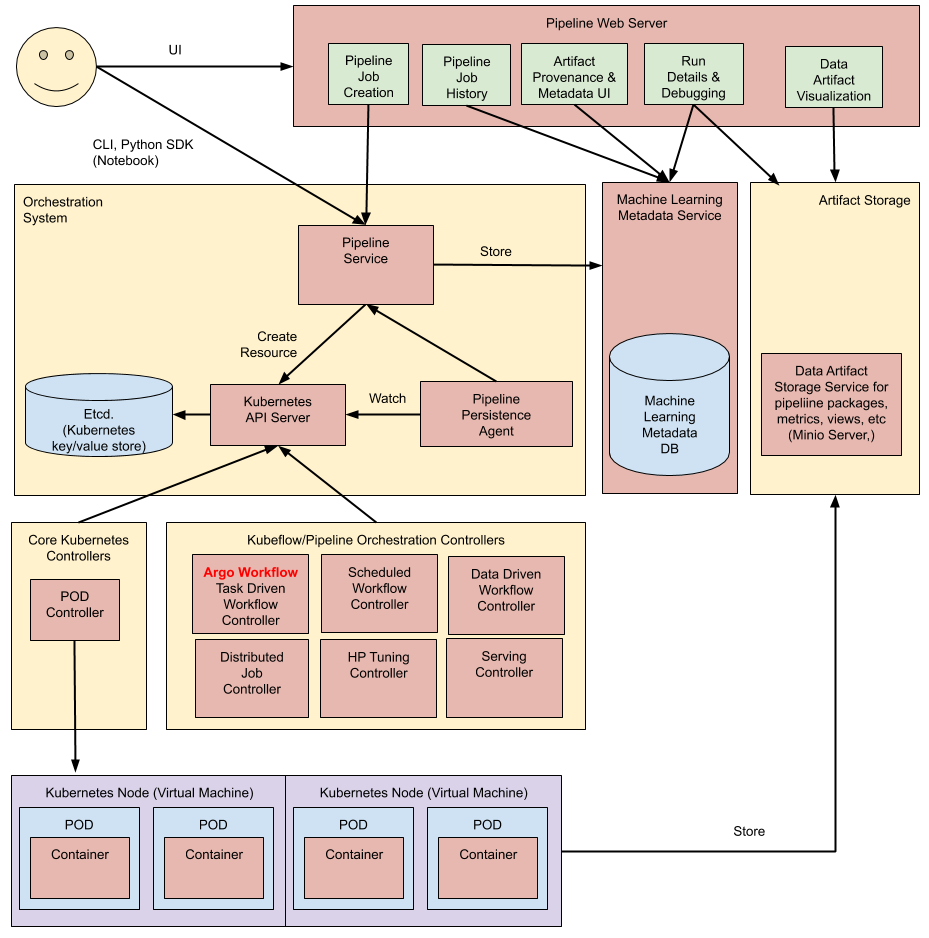


How to install Kubeflow

Preparation

Required Tools

  • Current only work for Kubeflow v1.0.0 (Newest is v1.3 on Portal and v1.7 ? in github ?)

  • Rancher 2.x

  • docker 19.03.13

    $ docker version
    Client: Docker Engine - Community
    Version:           19.03.13
    API version:       1.40
    Go version:        go1.13.15
    Git commit:        4484c46d9d
    Built:             Wed Sep 16 17:03:45 2020
    OS/Arch:           linux/amd64
    Experimental:      false
    
    Server: Docker Engine - Community
    Engine:
    Version:          19.03.13
    API version:      1.40 (minimum version 1.12)
    Go version:       go1.13.15
    Git commit:       4484c46d9d
    Built:            Wed Sep 16 17:02:21 2020
    OS/Arch:          linux/amd64
    Experimental:     false
    containerd:
    Version:          1.4.4
    GitCommit:        05f951a3781f4f2c1911b05e61c160e9c30eaa8e
    nvidia:
    Version:          1.0.0-rc93
    GitCommit:        12644e614e25b05da6fd08a38ffa0cfe1903fdec
    docker-init:
    Version:          0.18.0
    GitCommit:        fec3683
    
    • If you are running NVidia GPU server than please install nvidia container toolkit https://docs.nvidia.com/datacenter/cloud-native/container-toolkit/install-guide.html#id2

      • Install NVidia Toolkit for Docker (https://docs.nvidia.com/datacenter/cloud-native/container-toolkit/install-guide.html#installing-on-centos-7-8)
        • Setting up NVIDIA Container Toolkit
          # Setup the stable repository and the GPG key:
          $ distribution=$(. /etc/os-release;echo $ID$VERSION_ID) \
          && curl -s -L https://nvidia.github.io/nvidia-docker/$distribution/nvidia-docker.repo | sudo tee /etc/yum.repos.d/nvidia-docker.repo
          
          # install Nvidia Docker Toolkit
          $ sudo yum clean expire-cache
          $ sudo yum install -y nvidia-docker2
          $ sudo systemctl restart docker
          
    • setting docker daemons.json

      • setup docker damemon - for NVidia GPU Server
        sudo mkdir /etc/docker
        
        sudo cat > /etc/docker/daemon.json <<EOF
        {
            "default-runtime": "nvidia",
            "runtimes": {
                "nvidia": {
                    "path": "/usr/bin/nvidia-container-runtime",
                    "runtimeArgs": []
                }
            },
            "exec-opts": ["native.cgroupdriver=systemd"],
            "log-driver": "json-file",
            "log-opts": {
                "max-size": "100m"
            },
            "storage-driver": "overlay2",
            "storage-opts": ["overlay2.override_kernel_check=true"]
        }
        EOF
        
      • setup docker damemon - for NVidia GPU Server
        sudo systemctl --now enable docker
        or
        sudo systemctl enable docker
        sudo systemctl start docker
        systemctl status docker
        
  • K8s v1.16.15

    $ kubectl version
    Client Version: version.Info{Major:"1", Minor:"16", GitVersion:"v1.16.15", GitCommit:"2adc8d7091e89b6e3ca8d048140618ec89b39369", GitTreeState:"clean", BuildDate:"2020-09-02T11:40:00Z", GoVersion:"go1.13.15", Compiler:"gc", Platform:"linux/amd64"}
    Server Version: version.Info{Major:"1", Minor:"16", GitVersion:"v1.16.15", GitCommit:"2adc8d7091e89b6e3ca8d048140618ec89b39369", GitTreeState:"clean", BuildDate:"2020-09-02T11:31:21Z", GoVersion:"go1.13.15", Compiler:"gc", Platform:"linux/amd64"}    
    
    • kubectl client can be update by as below
      $ which kubectl
      /usr/bin/kubectl
      $ mkdir kubectl
      $ cd kubectl
      $  curl -LO https://dl.k8s.io/release/v1.16.15/bin/linux/amd64/kubectl
      $ sudo cp kubectl /usr/bin/kubectl
      $ kubectl version --client
      Client Version: version.Info{Major:"1", Minor:"16", GitVersion:"v1.16.15", GitCommit:"2adc8d7091e89b6e3ca8d048140618ec89b39369", GitTreeState:"clean", BuildDate:"2020-09-02T11:40:00Z", GoVersion:"go1.13.15", Compiler:"gc", Platform:"linux/amd64"}
      
    • kubectl server version can be selected when you create rancher k8s cluster
      • Rememeber Copy config file to ~/.kube/config
        $ mkdir .kube
        $ cd .kube/
        $ vi config
        # copy and paste k8s config
        $ chmod go-r ~/.kube/config
        
      • Rememeber Copy config file to ~/.kube/config
        $ curl -fsSL -o get_helm.sh https://raw.githubusercontent.com/helm/helm/master/scripts/get-helm-3
        $ chmod 700 get_helm.sh
        $ ./get_helm.sh
        $ helm version
        version.BuildInfo{Version:"v3.6.0", GitCommit:"7f2df6467771a75f5646b7f12afb408590ed1755", GitTreeState:"clean", GoVersion:"go1.16.3"}
        
      • if you are running NVidia GPU you will need Nvidia Plug-in$ kubectl create -f https://raw.githubusercontent.com/NVIDIA/k8s-device-plugin/v0.9.0/nvidia-device-plugin.yml
  • kfctl v1.2.0-0-gbc038f9

    $ mkdir kfctl
    $ cd kfctl
    $wget https://github.com/kubeflow/kfctl/releases/download/v1.2.0/kfctl_v1.2.0-0-gbc038f9_linux.tar.gz
    $ tar -xvf kfctl_v1.2.0-0-gbc038f9_linux.tar.gz
    $ chmod 755 kfctl
    $ cp kfctl /usr/bin
    $ kfctl version
    kfctl v1.2.0-0-gbc038f9
    
  • kustomize v4.1.3

    $ mkdir kustomize
    $ cd kustomize
    $ wget https://github.com/kubernetes-sigs/kustomize/releases/download/kustomize%2Fv4.1.3/kustomize_v4.1.3_linux_amd64.tar.gz
    $ tar -xzvf kustomize_v4.1.3_linux_amd64.tar.gz
    $ chmod 755 kustomize
    $ mv kustomize /use/bin/
    $ kustomize version
    {Version:kustomize/v4.1.3 GitCommit:0f614e92f72f1b938a9171b964d90b197ca8fb68 BuildDate:2021-05-20T20:52:40Z GoOs:linux GoArch:amd64}
    

Default Storage Class via Local Path

  • Add Extra Drive e.g. sdc for your nodes, you can skip if you don't need default storage class from local path

    • make partition fdisk /dev/sdc

    • make filesystem mkfs.xfs /dev/sdc1

    • make mount point mkdir /mnt/sdc1

    • change permission chmod 711 /mnt/sdc1

    • mount setting - check UUID

      $ sudo blkid /dev/sdb1
      /dev/sdb1: UUID="cae2b0cb-c45f-4f08-b698-8a6c49f80b76" TYPE="xfs" PARTUUID="f5183f01-c945-4a77-8aeb-a38296f67024"
      add /etc/fstab
      
    • edit /etc/fstab e.g. vi /etc/fstab

      #
      # /etc/fstab
      # Created by anaconda on Fri Mar  8 05:01:22 2019
      #
      # Accessible filesystems, by reference, are maintained under '/dev/disk'
      # See man pages fstab(5), findfs(8), mount(8) and/or blkid(8) for more info
      #
      /dev/mapper/centos-rootlv /                       xfs     defaults        0 0
      UUID=73a9046c-bd04-4021-a585-cd6ad1a9fe5f /boot                   xfs     defaults        0 0
      /dev/mapper/centos-swaplv swap                    swap    defaults        0 0
      /dev/mapper/centos-swaplv      none    swap    sw,comment=cloudconfig  0       0
      UUID=cae2b0cb-c45f-4f08-b698-8a6c49f80b76 /mnt/sdc1       xfs     defaults        0       0
      e
      
    • mount $ sudo mount -a

  • Setup local path storage class

    • login master node
      $ mkdir local-path-provisioner
      $ cd local-path-provisioner
      $ sudo yum install git -y
      $ git clone https://github.com/rancher/local-path-provisioner.git
      $ cd deploy
      $ vi local-path-storage.yaml
      # Search /opt and change it to e.g., </mnt/sdc1/local-path-provisioner>
      data:
          config.json: |-
              {
                      "nodePathMap":[
                      {
                              "node":"DEFAULT_PATH_FOR_NON_LISTED_NODES",
                              "paths":["/mnt/sdc1/local-path-provisioner"]
                      }
                      ]
              }
      
      $ kubectl apply -f local-path-storage.yaml
      namespace/local-path-storage created
      serviceaccount/local-path-provisioner-service-account created
      clusterrole.rbac.authorization.k8s.io/local-path-provisioner-role created
      clusterrolebinding.rbac.authorization.k8s.io/local-path-provisioner-bind created
      deployment.apps/local-path-provisioner created
      storageclass.storage.k8s.io/local-path created
      configmap/local-path-config created
      
      # double check
      $ ls /mnt/sdc1/local-path-provisioner/ -larth
      
      # mark default
      $ kubectl patch storageclass local-path -p '{"metadata": {"annotations":{"storageclass.kubernetes.io/is-default-class":"true"}}}'
      storageclass.storage.k8s.io/local-path patched
      
    • You can double check in Rancher

Installation

Setup Env variables Very Important

  • Setup Enviroment Variables
    $ mkdir kubeflow
    $ cd kubeflow
    
    $ export KF_NAME=kubeflow
    
    # your current directory e.g., pwd
    $ export BASE_DIR="/home/idps"
    
    $ export KF_DIR=${BASE_DIR}/${KF_NAME}
    
    # can skip
    $ mkdir -p ${KF_DIR}
    $ cd ${KF_DIR}
    
    $ wget https://raw.githubusercontent.com/kubeflow/manifests/v1.0-branch/kfdef/kfctl_k8s_istio.v1.0.0.yaml
    $ export CONFIG_URI=${KF_DIR}/"kfctl_k8s_istio.v1.0.0.yaml"
    
    $ echo ${CONFIG_URI}
    /home/idps/kubeflow/kfctl_k8s_istio.v1.0.0.yaml
    $ ls /home/idps/kubeflow/kfctl_k8s_istio.v1.0.0.yaml
    /home/idps/kubeflow/kfctl_k8s_istio.v1.0.0.yaml    
    
  • Or you can install directly from tar.gz but this one it never works for me.
    $ mkdir kubeflow
    $ cd kubeflow
    $ curl -L -O https://github.com/kubeflow/kfctl/releases/download/v1.0/kfctl_v1.0-0-g94c35cf_linux.tar.gz
    $ tar -xvf kfctl_v1.0-0-g94c35cf_linux.tar.gz
    $ mkdir yaml
    $ cd yaml
    $ export CONFIG_URI="https://raw.githubusercontent.com/kubeflow/manifests/v1.0-branch/kfdef/kfctl_k8s_istio.v1.0.0.yaml"
    

Install Kubeflow

  • Install (It will run a while since it will download images from external)

    $ kfctl apply -V -f ${CONFIG_URI}
    
    • if you are seeing this warn then it's fine just wait the cert-manager spin up

      WARN[0017] Encountered error applying application cert-manager:  (kubeflow.error): Code 500 with message: Apply.Run : error when creating "/tmp/kout072586623": Internal error occurred: failed calling webhook "webhook.cert-manager.io": the server could not find the requested resource  filename="kustomize/kustomize.go:284"
      
    • Double check

      $ kubectl get pods -n cert-manager
      NAME                                      READY   STATUS    RESTARTS   AGE
      cert-manager-cainjector-c578b68fc-d47zg   1/1     Running   0          100m
      cert-manager-fcc6cd946-h84bh              1/1     Running   0          100m
      cert-manager-webhook-657b94c676-v8mjv     1/1     Running   0          100m
      
      $ kubectl get pods -n istio-system
      NAME                                      READY   STATUS      RESTARTS   AGE
      cluster-local-gateway-78f6cbff8d-vtghm    1/1     Running     0          100m
      grafana-68bcfd88b6-2ndhj                  1/1     Running     0          100m
      istio-citadel-7dd6877d4d-blm58            1/1     Running     0          100m
      istio-cleanup-secrets-1.1.6-pzhkr         0/1     Completed   0          100m
      istio-egressgateway-7c888bd9b9-bgv5k      1/1     Running     0          100m
      istio-galley-5bc58d7c89-p2gbl             1/1     Running     0          100m
      istio-grafana-post-install-1.1.6-dbv25    0/1     Completed   0          100m
      istio-ingressgateway-866fb99878-rkhjs     1/1     Running     0          100m
      istio-pilot-67f9bd57b-fw5h5               2/2     Running     0          100m
      istio-policy-749ff546dd-g8brc             2/2     Running     2          100m
      istio-security-post-install-1.1.6-8fqzl   0/1     Completed   0          100m
      istio-sidecar-injector-cc5ddbc7-fpzxx     1/1     Running     0          100m
      istio-telemetry-6f6d8db656-tcgdx          2/2     Running     2          100m
      istio-tracing-84cbc6bc8-kdtqw             1/1     Running     0          100m
      kiali-7879b57b46-xbw6n                    1/1     Running     0          100m
      prometheus-744f885d74-4bpjp               1/1     Running     0          100m
      
      $ kubectl get pods -n knative-serving
      NAME                               READY   STATUS    RESTARTS   AGE
      activator-58595c998d-84jwb         2/2     Running   1          97m
      autoscaler-7ffb4cf7d7-jspgd        2/2     Running   2          97m
      autoscaler-hpa-686b99f459-f6v9c    1/1     Running   0          97m
      controller-c6d7f946-bs2n2          1/1     Running   0          97m
      networking-istio-ff8674ddf-l94d5   1/1     Running   0          97m
      webhook-6d99c5dbbf-bfdmw           1/1     Running   0          97m
      
      $ kubectl get pods -n kubeflow
      NAME                                                          READY   STATUS      RESTARTS   AGE
      admission-webhook-bootstrap-stateful-set-0                    1/1     Running     0          98m
      admission-webhook-deployment-59bc556b94-w2ghb                 1/1     Running     0          97m
      application-controller-stateful-set-0                         1/1     Running     0          100m
      argo-ui-5f845464d7-8cds6                                      1/1     Running     0          98m
      centraldashboard-d5c6d6bf-lfdsh                               1/1     Running     0          98m
      jupyter-web-app-deployment-544b7d5684-vqjn8                   1/1     Running     0          98m
      katib-controller-6b87947df8-c8jg4                             1/1     Running     0          97m
      katib-db-manager-54b64f99b-zsf7n                              1/1     Running     0          97m
      katib-mysql-74747879d7-vqjpp                                  1/1     Running     0          97m
      katib-ui-76f84754b6-ch8qq                                     1/1     Running     0          97m
      kfserving-controller-manager-0                                2/2     Running     1          98m
      metacontroller-0                                              1/1     Running     0          98m
      metadata-db-79d6cf9d94-blzgc                                  1/1     Running     0          98m
      metadata-deployment-5dd4c9d4cf-j7t89                          1/1     Running     0          98m
      metadata-envoy-deployment-5b9f9466d9-mb7mf                    1/1     Running     0          98m
      metadata-grpc-deployment-66cf7949ff-m4q6v                     1/1     Running     1          98m
      metadata-ui-8968fc7d9-559fz                                   1/1     Running     0          98m
      minio-5dc88dd55c-nf7rz                                        1/1     Running     0          97m
      ml-pipeline-55b669bf4d-fcjz7                                  1/1     Running     0          97m
      ml-pipeline-ml-pipeline-visualizationserver-c489f5dd8-7lcbh   1/1     Running     0          97m
      ml-pipeline-persistenceagent-f54b4dcf5-lc2f2                  1/1     Running     0          97m
      ml-pipeline-scheduledworkflow-7f5d9d967b-brw6d                1/1     Running     0          97m
      ml-pipeline-ui-7bb97bf8d8-dfnkd                               1/1     Running     0          97m
      ml-pipeline-viewer-controller-deployment-584cd7674b-ww575     1/1     Running     0          97m
      mysql-66c5c7bf56-62rr8                                        1/1     Running     0          97m
      notebook-controller-deployment-576589db9d-sl6dx               1/1     Running     0          98m
      profiles-deployment-769b65b76d-jpgs4                          2/2     Running     0          97m
      pytorch-operator-666dd4cd49-k5ph9                             1/1     Running     0          98m
      seldon-controller-manager-5d96986d47-h2sd4                    1/1     Running     0          97m
      spark-operatorcrd-cleanup-v6jbm                               0/2     Completed   0          98m
      spark-operatorsparkoperator-7c484c6859-tmgtg                  1/1     Running     0          98m
      spartakus-volunteer-7465bcbdc-q7vbd                           1/1     Running     0          97m
      tensorboard-6549cd78c9-bm57g                                  1/1     Running     0          97m
      tf-job-operator-7574b968b5-27xqt                              1/1     Running     0          97m
      workflow-controller-6db95548dd-s4mzx                          1/1     Running     0          98m
      
    • You can also create a project e.g., Kubeflow in Rancher and Move istio-systemknative-servingkubeflow and local-path-storage to your project e.g., Kubeflow

      • Then go to Prject's Resource -->Workloads and will display more detail for the status.
  • Delete Don't manual delete one by one if you want to restart

    $ kfctl Delete  -V -f ${CONFIG_URI}
    
  • Login Kubeflow

    • Under Rancher, it's pretty straightforward. Just go to Project's Resource --> Workloads --> Active istio-ingressgateway try those tcp ports since it's automatically mapping w/ Server Ports.

    • Check Port Mapping, e.g., 80:31380/TCP the port is 31388

      $ kubectl -n istio-system get svc istio-ingressgateway
      NAME                   TYPE       CLUSTER-IP     EXTERNAL-IP   PORT(S)                                                                                                                                      AGE
      istio-ingressgateway   NodePort   10.43.97.164   <none>        15020:30228/TCP,80:31380/TCP,443:31390/TCP,31400:31400/TCP,15029:30932/TCP,15030:30521/TCP,15031:30290/TCP,15032:31784/TCP,15443:30939/TCP   120m

Tuesday, December 11, 2018

How to setup rancher 2.x cluster ( with 3 nodes example )

0.prepare rancher controller nodes

Here we use 3 nodes as rancher High Availability ( HA ) installation.

For creating a VM I was using Proxmox but it can be any VM solution such as VirtualBox or VMWare ... etc.

Then you build your VM base on Rancher OS (ROS - https://github.com/rancher/os/releases). I try CentOS and Ubuntu OS, however, you need to deal with those firewall rules (https://rancher.com/docs/rancher/v2.x/en/installation/references/) ... etc which is kinds of lousy.


Then you prepare a `cloud-config.yml` file the example can be as below.

#cloud-config hostname: {{ hostname }} rancher:
network:
interfaces:
eth0:
address: {{ ip_address }}/{{ subnet_mask}}
gateway: {{ gateway }}
dns:
nameservers:
- {{ nameserver_1 }}
- {{ nameserver_2 }}
- {{ nameserver_3 }} ssh_authorized_keys:
- {{ ssh_key_public }}

$ sudo ros install -c cloud-config.yml -d /dev/sda

Then you can jump from your management note with the key you put in cloud-config.yml

$ ssh rancher@<rancher node ip>

# e.g. ssh rancher@192.168.60.44

1.Create Nodes and LB

Here, we try ngnix on e.g. 192.168.1.100 - Ref: https://rancher.com/docs/rancher/v2.x/en/installation/ha/create-nodes-lb/nginx/

a. install NGNIX 

Ref: https://www.nginx.com/resources/wiki/start/topics/tutorials/install/ but in my test case I use alpine Ref: https://wiki.alpinelinux.org/wiki/Nginx

b. create NGINX Configuration 

e.g. ngnix.conf in /etc/nginx/nginx.conf
From nginx.conf, replace <IP_NODE_1>, <IP_NODE_2>, and <IP_NODE_3> with the IPs of your node.

worker_processes 4;
worker_rlimit_nofile 40000;

events {
    worker_connections 8192;
}

http {
    server {
        listen         80;
        return 301 https://$host$request_uri;
    }
}

stream {
    upstream rancher_servers {
        least_conn;
        server <IP_NODE_1>:443 max_fails=3 fail_timeout=5s;
        server <IP_NODE_2>:443 max_fails=3 fail_timeout=5s;
        server <IP_NODE_3>:443 max_fails=3 fail_timeout=5s;
    }
    server {
        listen     443;
        proxy_pass rancher_servers;
    }
}

Save nginx.conf to your load balancer at the following path: /etc/nginx/nginx.conf.

c. restart ngnix

$ nginx -s reload

2.Install k8s with RKE

Ref: https://rancher.com/docs/rancher/v2.x/en/installation/ha/kubernetes-rke/

a. Create the rancher-cluster.yml file

The contenct template can look like as below.

nodes:
  - address: 165.227.114.63
    internal_address: 172.16.22.12
    user: ubuntu
    role: [controlplane,worker,etcd]
  - address: 165.227.116.167
    internal_address: 172.16.32.37
    user: ubuntu
    role: [controlplane,worker,etcd]
  - address: 165.227.127.226
    internal_address: 172.16.42.73
    user: ubuntu
    role: [controlplane,worker,etcd]

services:
  etcd:
    snapshot: true
    creation: 6h
    retention: 24h


here is our real example
nodes:
  - address: 192.168.1.101
    internal_address: 192.168.1.101
    user: rancher
    role: [controlplane,worker,etcd]
  - address: 192.168.1.102
    internal_address: 192.168.1.102
    user: rancher
    role: [controlplane,worker,etcd]
  - address: 192.168.1.103
    internal_address: 192.168.1.103
    user: rancher
    role: [controlplane,worker,etcd]

services:
  etcd:
    snapshot: true
    creation: 6h
    retention: 24h

b. Install RKE

Ref: https://rancher.com/docs/rke/v0.1.x/en/installation/
PS: we prepare RKE to install on sac-mgmt since it has all the ssh key in ros node. For install RKE it required ssh privilege, however after RKE install k8s, we can leverage k8s API server to run kubectl and helm from the client ( your mac or ubuntu ).

download rke from https://github.com/rancher/rke/releases

$ wget https://github.com/rancher/rke/releases/download/v0.1.13/rke_darwin-amd64

mv name

# MacOS
$ mv rke_darwin-amd64 rke
# Linux
$ mv rke_linux-amd64 rke
# Windows PowerShell
> mv rke_windows-amd64.exe rke.exe

make executable

$ chmod +x rke

double check via checkin rke version

$ ./rke --version

c. Run RKE

$ rke up --config ./rancher-cluster.yml

After installation doen you should be able to see kube_config_rancher-cluster.yml. The content looks like this , you can copy it into your local

$ cat kube_config_rancher-cluster.yml
apiVersion: v1
kind: Config
clusters:
- cluster:
    api-version: v1
    certificate-authority-data: xxx
    server: "https://192.168.1.101:6443"
  name: "local"
contexts:
- context:
    cluster: "local"
    user: "kube-admin-local"
  name: "local"
current-context: "local"
users:
- name: "kube-admin-local"
  user:
    client-certificate-data: xxx
    client-key-data: xxx

d. Test Cluster

Test cluster can be done by your client( mac or Ubuntu PC). First of all, you need to install kubectl.
Ref: https://kubernetes.io/docs/tasks/tools/install-kubectl/#install-kubectl

For Mac: https://kubernetes.io/docs/tasks/tools/install-kubectl/#install-with-homebrew-on-macos
$ brew install kubernetes-cli

For Ubuntu:
sudo apt-get update && sudo apt-get install -y apt-transport-https
curl -s https://packages.cloud.google.com/apt/doc/apt-key.gpg | sudo apt-key add -
echo "deb https://apt.kubernetes.io/ kubernetes-xenial main" | sudo tee -a /etc/apt/sources.list.d/kubernetes.list
sudo apt-get update
sudo apt-get install -y kubectl

Then you need to set configuration
You can copy this file to $HOME/.kube/config or if you are working with multiple Kubernetes clusters, set the KUBECONFIG environmental variable to the path of kube_config_rancher-cluster.yml.

$ export KUBECONFIG=$(pwd)/kube_config_rancher-cluster.yml

$ kubectl get nodes
NAME             STATUS    AGE       VERSION
192.168.1.101   Ready     2d        v1.11.5
192.168.1.102   Ready     2d        v1.11.5
192.168.1.103   Ready     2d        v1.11.5

Try kubectl get all

$ kubectl get all --all-namespaces
NAMESPACE       NAME                                       READY     STATUS    RESTARTS   AGE
cattle-system   po/cattle-cluster-agent-5cfc664c96-zgz64   1/1       Running   0          2d
cattle-system   po/cattle-node-agent-dgb6x                 1/1       Running   0          2d
cattle-system   po/cattle-node-agent-p8c8s                 1/1       Running   0          2d
cattle-system   po/cattle-node-agent-vwlfl                 1/1       Running   0          2d
cattle-system   po/rancher-f4fb5f5c6-79qf9                 1/1       Running   7          2d
cattle-system   po/rancher-f4fb5f5c6-7nrz5                 1/1       Running   4          2d
cattle-system   po/rancher-f4fb5f5c6-xn4kc                 1/1       Running   6          2d
ingress-nginx   po/default-http-backend-797c5bc547-8jtnq   1/1       Running   0          2d
ingress-nginx   po/nginx-ingress-controller-kg9dp          1/1       Running   0          2d
ingress-nginx   po/nginx-ingress-controller-r9kcj          1/1       Running   0          2d
ingress-nginx   po/nginx-ingress-controller-znjs8          1/1       Running   0          2d
kube-system     po/canal-hjw45                             3/3       Running   0          2d
kube-system     po/canal-pm5hq                             3/3       Running   0          2d
kube-system     po/canal-qxgkk                             3/3       Running   0          2d
kube-system     po/cert-manager-7d4bfc44ff-x6v2k           1/1       Running   0          2d
kube-system     po/kube-dns-7588d5b5f5-gd4br               3/3       Running   0          2d
kube-system     po/kube-dns-autoscaler-5db9bbb766-2g528    1/1       Running   0          2d
kube-system     po/metrics-server-97bc649d5-pqdg8          1/1       Running   0          2d
kube-system     po/tiller-deploy-7b6f5d9dbc-76qxf          1/1       Running   0          2d

NAMESPACE       NAME                       CLUSTER-IP     EXTERNAL-IP   PORT(S)         AGE
cattle-system   svc/rancher                10.43.253.92   <none>        80/TCP          2d
default         svc/kubernetes             10.43.0.1      <none>        443/TCP         2d
ingress-nginx   svc/default-http-backend   10.43.46.215   <none>        80/TCP          2d
kube-system     svc/kube-dns               10.43.0.10     <none>        53/UDP,53/TCP   2d
kube-system     svc/metrics-server         10.43.3.216    <none>        443/TCP         2d
kube-system     svc/tiller-deploy          10.43.72.38    <none>        44134/TCP       2d

NAMESPACE     NAME                                     DESIRED   SUCCESSFUL   AGE
kube-system   jobs/rke-ingress-controller-deploy-job   1         1            2d
kube-system   jobs/rke-kubedns-addon-deploy-job        1         1            2d
kube-system   jobs/rke-metrics-addon-deploy-job        1         1            2d
kube-system   jobs/rke-network-plugin-deploy-job       1         1            2d

NAMESPACE       NAME                          DESIRED   CURRENT   UP-TO-DATE   AVAILABLE   AGE
cattle-system   deploy/cattle-cluster-agent   1         1         1            1           2d
cattle-system   deploy/rancher                3         3         3            3           2d
ingress-nginx   deploy/default-http-backend   1         1         1            1           2d
kube-system     deploy/cert-manager           1         1         1            1           2d
kube-system     deploy/kube-dns               1         1         1            1           2d
kube-system     deploy/kube-dns-autoscaler    1         1         1            1           2d
kube-system     deploy/metrics-server         1         1         1            1           2d
kube-system     deploy/tiller-deploy          1         1         1            1           2d

NAMESPACE       NAME                                 DESIRED   CURRENT   READY     AGE
cattle-system   rs/cattle-cluster-agent-5cfc664c96   1         1         1         2d
cattle-system   rs/rancher-f4fb5f5c6                 3         3         3         2d
ingress-nginx   rs/default-http-backend-797c5bc547   1         1         1         2d
kube-system     rs/cert-manager-7d4bfc44ff           1         1         1         2d
kube-system     rs/kube-dns-7588d5b5f5               1         1         1         2d
kube-system     rs/kube-dns-autoscaler-5db9bbb766    1         1         1         2d
kube-system     rs/metrics-server-97bc649d5          1         1         1         2d
kube-system     rs/tiller-deploy-7b6f5d9dbc          1         1         1         2d

3.Initialize Helm (Install Tiller)

Ref: https://rancher.com/docs/rancher/v2.x/en/installation/ha/helm-init/

a. install tiller on k8s cluster

$ kubectl -n kube-system create serviceaccount tiller

$ kubectl create clusterrolebinding tiller \
  --clusterrole cluster-admin \
  --serviceaccount=kube-system:tiller

$ helm init --service-account tiller

b. test your tiller via k8s

kubectl -n kube-system  rollout status deploy/tiller-deploy
Waiting for deployment "tiller-deploy" rollout to finish: 0 of 1 updated replicas are available...
deployment "tiller-deploy" successfully rolled out
c. test your tiller via helm
Before you test with helm, you need to install helm Ref: https://rancher.com/docs/rancher/v2.x/en/installation/ha/helm-init/
Or you just download binary should work still Prefer way - Ref: https://github.com/helm/helm/releases

PS: watch out the helm vs tiller version match, in our prod we need to use helm v2.8 only since newest v2.12 miss matches the tiller which is installed by rancher.

$ ./darwin-amd64/helm version
Client: &version.Version{SemVer:"v2.8.2", GitCommit:"a80231648a1473929271764b920a8e346f6de844", GitTreeState:"clean"}
Server: &version.Version{SemVer:"v2.8.0", GitCommit:"14af25f1de6832228539259b821949d20069a222", GitTreeState:"clean"}

4.Install Rancher

Ref: https://rancher.com/docs/rancher/v2.x/en/installation/ha/helm-rancher/

a. Add helm chart repo for rancher

Use helm repo add the command to add the Helm chart repository that contains charts to install Rancher. For more information about the repository choices and which is best for your use case, see Choosing a Version of Rancher.

Replace both occurences of <CHART_REPO> with the Helm chart repository that you want to use (i.e. latest or stable).
helm repo add rancher-<CHART_REPO> https://releases.rancher.com/server-charts/<CHART_REPO>

$ ./helm repo add rancher-stable 
https://releases.rancher.com/server-charts/stable

$ ./helm repo list
NAME          URL
stable        https://kubernetes-charts.storage.googleapis.com
local          http://127.0.0.1:8879/charts
rancher-stable https://releases.rancher.com/server-charts/stable

b. Choose SSL configuration.

This example uses cert-manager

install cert-manager

$ helm install stable/cert-manager \
  --name cert-manager \
  --namespace kube-system

wait cert-manger roll out

$ kubectl -n kube-system rollout status deploy/cert-manager
Waiting for deployment "cert-manager" rollout to finish: 0 of 1 updated replicas are available...
deployment "cert-manager" successfully rolled out

double check cert-manager

$ ./helm list
NAME        REVISION UPDATED                  STATUS  CHART              NAMESPACE
cert-manager 1        Sat Dec  8 04:32:41 2018 DEPLOYED cert-manager-v0.5.2 kube-system

c. Install Rancher


install rancher

$ ./helm install rancher-stable/rancher   --name rancher   --namespace cattle-system   --set hostname=rancher2.swiftstack.org

wait for rancher roll out

$ kubectl -n cattle-system rollout status deploy/rancher
Waiting for deployment "rancher" rollout to finish: 0 of 3 updated replicas are available...
deployment "rancher" successfully rolled out

double check rancher

$ ./helm list
NAME        REVISION UPDATED                  STATUS  CHART              NAMESPACE
cert-manager 1        Sat Dec  8 04:32:41 2018 DEPLOYED cert-manager-v0.5.2 kube-system
rancher      1        Sat Dec  8 04:35:50 2018 DEPLOYED rancher-2018.12.1  cattle-system

Try using our own Cert files

set up secret - Ref: https://rancher.com/docs/rancher/v2.x/en/installation/ha/helm-rancher/tls-secrets/

PS: Combine the server certificate followed by an intermediate certificate(s) needed into a file named tls.crt. Copy your certificate key into a file named tls.key.

$ kubectl -n cattle-system create secret tls tls-rancher-ingress \
  --cert=tls.crt \
  --key=tls.key

Using a Private CA-Signed Certificate
If you are using a private CA, Rancher requires a copy of the CA certificate which is used by the Rancher Agent to validate the connection to the server.

Copy the CA certificate into a file named cacerts.pem and use kubectl to create the tls-ca secret in the cattle-system namespace.
Important: Make sure the file is called cacerts.pem as Rancher uses that filename to configure the CA certificate.

$ kubectl -n cattle-system create secret generic tls-ca \
  --from-file=cacerts.pem

Install with cert file

$ helm install rancher-<CHART_REPO>/rancher \
  --name rancher \
  --namespace cattle-system \
  --set hostname=rancher.my.org \
  --set ingress.tls.source=secret

wait for rancher roll out

kubectl -n cattle-system rollout status deploy/rancher
Waiting for deployment "rancher" rollout to finish: 0 of 3 updated replicas are available...
deployment "rancher" successfully rolled out

double check

kubectl -n cattle-system get deploy rancher
NAME      DESIRED   CURRENT   UP-TO-DATE   AVAILABLE   AGE
rancher   3         3         3            3           3m

5.Remove Rancher

a. remove rancher helm

$ ./helm del --purge rancher

b. remove k8s cluster

$ rke remove --config rancher-cluster.yml

c. reinstall ros 

just repeat section 0.prepare rancher controller nodes

Reference
https://rancher.com/docs/rancher/v2.x/en/installation/ha/